Select your location
Select your language and location to see actual shipping costs and lead times.

Search results
In this category, you will find 5 wall mounts for TVs from 14 to 120 inches, with a load capacity from 20 to 120 kg. Three swivel and adjustable mounts, one ultra slim tilting mount and one fixed ultra slim mount for the largest screens are available.
A wall mount allows you to safely install your TV on the wall, save space and adjust the position of the TV screen to the room layout. Depending on the model, you can choose a fixed mount, a tilting mount, a movable mount with 3D adjustment, a swivel mount with extension or an ultra slim mount for large screens.
In this category, you will find 5 wall mounts for TVs: three movable, swivel and adjustable models, one ultra slim tilting mount and one fixed ultra slim mount for the largest screens. The offer includes mounts for TVs from 14 to 120 inches, with a load capacity from 20 to 120 kg and different VESA ranges adapted to small, medium and large screens.
The available mounts allow you to hang your TV securely on the wall. Movable models make it possible to adjust the TV position, change the tilt angle, rotate the screen and extend it from the wall, while the ultra slim tilting model allows you to tilt the screen without moving it far away from the wall.
The VESA standard defines the spacing of the mounting holes on the back of the TV. To choose the right mount, check the VESA spacing of your TV model and then compare it with the range supported by the selected wall mount.
The offer includes mounts compatible with the most commonly used VESA ranges: 75×75–200×200 mm for smaller TVs, 100×100–400×400 mm, 150×150–600×400 mm, 150×150–700×400 mm and 150×150–1000×600 mm for large screens. This makes it easier to match the mount to the TV’s diagonal, weight and installation location.
A swivel mount is worth choosing when you need to adjust the TV position and watch from different places in the room. Swivel models allow you to change the screen position, tilt the TV screen, extend it from the wall and set the screen plane at a comfortable angle.
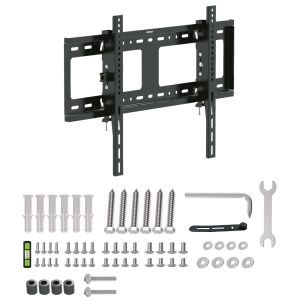
An ultra slim tilting mount is suitable when the TV is to hang close to the wall, but tilt angle adjustment is still needed. If the screen does not require frequent position changes, a fixed ultra slim mount will be a good choice, ensuring a minimalist look and stable TV mounting.
Swivel TV mounts make it possible to adjust the screen in several planes. A movable, tilting and extendable mount allows you to adapt the TV screen to a sofa, armchair, table or kitchenette.
Depending on the model, full adjustment is available: rotation up to 180°, tilt angle adjustment, extension up to 415 mm and TV position adjustment after installation. It is a practical solution when one TV mounting point needs to serve several viewing zones.
To choose the right mount, check three parameters: screen diagonal, TV weight and VESA spacing. Then decide whether you need a fixed, swivel, tilting or extendable model.
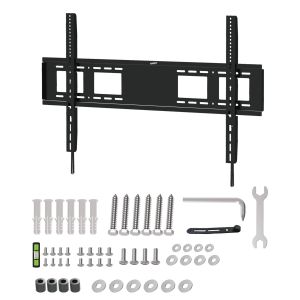
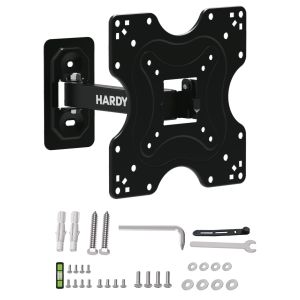
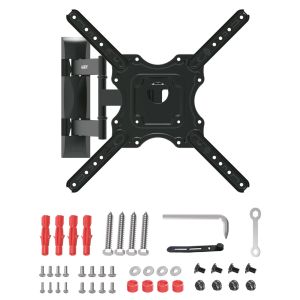
For the largest 60"–120" screens, choose the 3mk HARDY® MaxX 120™ mount with a load capacity of up to 120 kg. For 32"–80" TVs, the 3mk HARDY® SlimGrip Pro 80™ ultra slim tilting mount with a load capacity of up to 80 kg is suitable. For large 55"–90" TVs, you can choose 3mk HARDY® StableMount 75™ with 120° rotation, tilt and extension. For popular 32"–70" screens, 3mk HARDY® Xplore 35™ is suitable, and for small 14"–42" TVs – the compact 3mk HARDY® SlimGrip 20™.
Mounting a TV on the wall requires matching the mount to the wall type, equipment weight and installation level. Before installation, it is worth determining the TV mounting location, screen height and mount installation level so that the screen is positioned at a comfortable eye line.
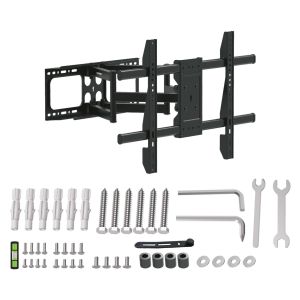
Each wall mount in this category includes a mounting kit that makes it easier to hang the TV without specialist tools. Solid TV mounting increases equipment safety, while proper TV position adjustment improves viewing comfort.
The choice of mount depends on the TV size, its weight, VESA spacing and expected adjustment. If the most important factor is the minimum distance from the wall, choose the 3mk HARDY® MaxX 120™ fixed ultra slim mount or the 3mk HARDY® SlimGrip Pro 80™ ultra slim tilting mount. If you need more complete adjustment, check the movable swivel mounts: StableMount 75™, Xplore 35™ and SlimGrip 20™.
Choose a mount compatible with your TV’s diagonal, weight and VESA spacing. For large screens, a wall mount with a high load capacity is suitable, while for rooms with several viewing spots, a movable mount with rotation, tilt and extension will be better.
The VESA standard means the spacing of the mounting holes on the back of the TV. A VESA mount should support the same spacing, e.g. 100×100, 200×200, 400×400 or 1000×600 mm.
A swivel mount fits a TV when the diagonal, equipment weight and VESA spacing match. Before purchase, check the TV specification and the maximum load capacity of the mount.
An ultra slim mount is worth choosing when the TV is to be mounted very close to the wall. It is a good solution for a living room where a minimalist look and stable TV mounting are important.
Yes, a movable mount can allow tilt angle adjustment, rotation and extension. This makes it possible to tilt the TV screen, reduce light reflections and adapt the image to the seating position.
For 60"–120" TVs, choose 3mk HARDY® MaxX 120™. It is an ultra slim wall mount with a load capacity of up to 120 kg, a 28 mm profile from the wall and a VESA range of 150×150–1000×600.
For 55"–90" TVs, 3mk HARDY® StableMount 75™ is suitable. It is a swivel VESA mount with a load capacity of up to 75 kg, 120° rotation, +3°/–12° tilt and 55–415 mm extension.
Yes, for small TVs it is worth choosing a compact swivel mount. 3mk HARDY® SlimGrip 20™ supports 14"–42" screens, VESA 75×75–200×200, load capacity up to 20 kg, 180° rotation and 46–205 mm extension.
The price of a mount depends on load capacity, VESA range, supported TV size, construction and adjustment options. The simplest models for smaller screens are cheaper, while movable mounts for large TVs cost more due to reinforced construction and full adjustment.




Login and Registration Form